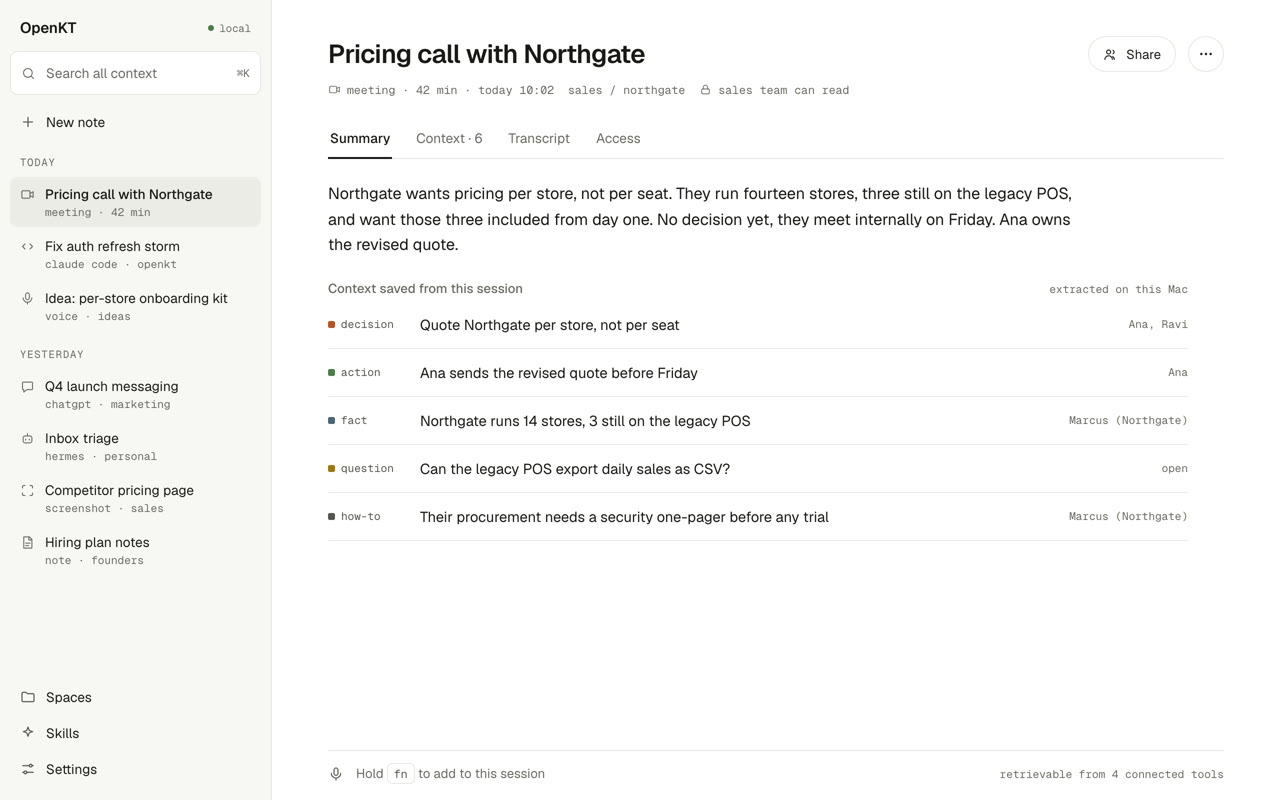
The OpenKT app. A sidebar lists today's sessions: a pricing call, a Claude Code session, a voice note, a ChatGPT chat and a screenshot. The open one, a pricing call with Northgate, shows a short summary and the six things saved from it.

Stop re-explaining your team to every AI.

OpenKT syncs your team's meetings and AI sessions into one shared place. Nobody pastes the call into their assistant, and nobody relays what their assistant worked out to everybody else.

Try free on Mac

Free to start. Open source, and yours to self-host.

Meetings reach your agent.

Whatever the call worked out is there the next time you open an assistant. You never paste a recap into a prompt again.

Your work reaches your team.

What your session figures out shows up in your colleagues' tools too. No handover message, no summary dropped into a channel.

You do neither by hand.

No tagging, no doc, no folder to keep tidy. It is picked up and filed while you work, and you notice it only when something you needed is already there.

Nobody briefs anybody.

Right now one person pastes the meeting into their assistant, and somebody else relays what that assistant found. OpenKT takes both jobs off the team.

010203

It gets written down

Hold a key and talk, or let the call run. Your Mac transcribes it, pulls out what matters, and files it as one sentence with your name on it.

fn listening 0:06

Ship the onboarding kit per store, not per account.

idea Ship the onboarding kit per store → ideas

transcribed on this Mac · the audio never left it

010203

Somebody else's agent asks

Ravi was not on Tuesday's call and has read nobody's notes. He asks his own assistant on Thursday and it comes back with the three lines that matter.

Draft the Northgate proposal. What do we already know?

OpenKT 3 of 11 things your team knows
decision Quote Northgate per store, not per seatPratham · pricing call · Tue
fact 14 stores, 3 still on the old till systemPratham · pricing call · Tue
how-to Procurement wants a security one-pager firstRavi · intro call · 4 Sep

select an item to add it to this conversation

010203

And it stays true

When the answer changes, the page changes with it. The old line stays struck through rather than vanishing, so anyone can see what moved and when.

Northgate pricing

Per seat, with a volume discount above 40 seats2

Per store. All fourteen included from the start1

Procurement wants a security one-pager first3

kept current from 4 sessions · last change today 10:48

Syncing is automatic. Sharing is not.

Everything lands first in a space only you can see. You decide what moves into a project, a customer or the whole team, and a colleague's assistant can only ever read what you moved.

Access is checked before the answer is written.

The filter runs inside the search rather than trimming the result afterwards, so a line nobody granted you is never in front of a model at all.

Reader, editor or owner, on a workspace, on one project, or on a single conversation. Revoke it and the answers change on the next question, not on the next sync.

It works inside the assistant you already use.

Paste one setup line and it connects itself. There is no new app to live in and no tab anyone has to remember to open.

And anything else that speaks the Model Context Protocol, which by now is most of them.

One engine, two ways to run it.

The same software either way. There are no features we keep for ourselves.

We run it for you

Sign in, connect your tools, get on with the day. Your team's store lives on our servers, encrypted, and nothing in it trains anything.

  • Working in about two minutes
  • Meetings, voice and screenshots included
  • Everything exportable on any day you like
Try free on Mac

You run it yourself

One server and one Postgres, on a machine you own. Point the models at your own endpoints and none of it leaves the building.

  • Apache-2.0, all of it
  • Any OpenAI-compatible model endpoint
  • No graph database, no broker, no queue to babysit
Read the quickstart

Questions people ask first.

How is this different from the memory my assistant already has?

That memory stops at you and at one company's product. Your colleague's tool cannot read it, it has no idea who is allowed to see what, and it never hears a meeting. OpenKT sits behind all of them and is the one thing every assistant on the team can read.

Is this a wiki with extra steps?

Somebody has to write a wiki, and after the second week nobody does. Here the writing is a side effect of work that was already happening. The pages keep themselves current, and when you disagree with one you edit it and your version wins.

Does something join our meetings?

No. It records from your own machine, the way you would record a voice memo. Nobody on the call sees an extra participant. You see a recording state the whole time, and your workspace can require everyone to agree first, or switch it off completely.

Do you train on our data?

No, and there is no plan or paid tier where we do. On your own server the question does not arise at all, because none of it ever reaches us.

Somebody leaves. What happens to what they knew?

It stays, with their name on it, which is most of the point. You revoke their access, and everything they put into shared spaces is still there for the rest of the team, still attributed, still cited on the pages it built.

What if I say something I did not mean to share?

Everything starts in a space that is only yours. Nothing moves anywhere shared unless you send it, or unless you set a tool up to file there on purpose, and you can move or delete anything afterwards.

Try it on this week's meetings.

Install it, let it sit through one call, then open your assistant and ask what was decided. That is the whole demonstration.

Try free on Mac

Free to start. Open source, and yours to self-host.

Or let your AI install it. Paste this into Claude Code, Codex or Cowork:

Install the OpenKT Mac app for me: download https://openkt-downloads-724772068721.s3.ap-south-1.amazonaws.com/desktop/OpenKT-latest-arm64.dmg,
open the disk image, copy OpenKT.app to /Applications, then run
xattr -dr com.apple.quarantine /Applications/OpenKT.app
(the preview build is not signed yet, so macOS blocks it until then) and open it.

If macOS says OpenKT can't be opened, run this once in Terminal:

xattr -dr com.apple.quarantine /Applications/OpenKT.app

Connect any AI tool to your team's context: https://mcp.openkt.ai/mcp